Modifying Priority Assignments
In Priority, you can change the priority of a job or repair order assigned to a technician. You can also reassign a job or repair order and assign it to a different technician.
To Change the Priority of Jobs or Repair Orders for a Technician
In either the job or repair order view, you set the priority of tiles by dragging and dropping the tiles within a technician column.
When the red bar appears at the bottom of a tile in the list, the tile being dragged will be dropped immediately after that tile. The red bar always indicates where the job or repair order will be dropped.
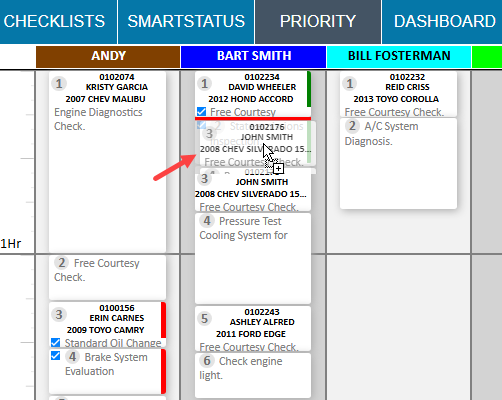
The number is automatically updated to the next number in the sequence.
Use drag and drop to move the tile up or down to change the priority for each technician.
To Reassign a Job or Repair Order to a Different Technician
Drag and drop the tile from its location in the assigned technician column to the technician’s name in another column. The job is dropped to the bottom of the list in the new technician’s column.